
GPT Image 2.5 Resolution Explained: Can It Generate True 4K Images?
 Yifan Zhao7 min de lectura ·
Quick Answer
Yes, the API-backed route in my test delivered a 3840 × 2160 image. The same prompt in ChatGPT and Codex produced 1672 × 941 images. Those smaller files needed enlargement to fill the intended 4K display at its full pixel dimensions.
However, a 4K file is not automatically ready for professional use. Its texture, edges, product geometry, and final layout still need inspection. Choose a generation route by the dimensions it actually delivers, then judge whether the image holds up at the required size.
What Does "True 4K" Mean for an AI Image?
For this article, 4K means a 3840 × 2160 UHD image. That was the target for my furniture campaign, which was designed for a landscape showroom display.
Three different questions often get mixed together:
Question | What to check |
Is the file 4K? | Its actual pixel width and height |
Does it contain useful detail? | Material texture, seams, edges, and fine features at the intended size |
Was it generated without enlargement? | The generation and processing history |
A file can meet the first requirement while looking soft or overprocessed. A smaller image can look convincing on a laptop while lacking enough pixels for the final display.
File dimensions alone also cannot reveal a model's internal rendering process. In this test, "direct 4K output" means I received a 3840 × 2160 file without applying a separate upscale step myself.
Writing "4K" in a prompt is a request. The downloaded file is the evidence that the size requirement was met.
Why ChatGPT, API, and Codex Outputs Can Differ
The entry point matters because it affects which settings you can control. A prompt can describe the same image across several tools, while the available model and size controls differ.
In my API-backed interface, I could select the image model and output dimensions. ChatGPT and the built-in Codex generation route did not give me the same controls during this test.
Route | What mattered in this test |
API-backed generation | An explicit output-size selection was available |
ChatGPT image generation | The prompt requested 4K, but the downloaded image was smaller |
Codex built-in image generation | The downloaded image was also smaller than requested |
Here, API-backed generation means an interface connected to an API. It was not a raw API request with request logs available for inspection.
The Codex result came from its built-in image generation tool. Using Codex to write code that calls an external image API would be a different route, with that API's settings and output handling.
These results do not establish permanent size limits for ChatGPT or Codex. They show what each route delivered in this project. They also do not prove that all three routes used the same image model version.
Our Test: A Furniture Campaign for a 4K Display
I used one prompt across all three routes. It requested a landscape image at 3840 × 2160, with an ivory upholstered lounge chair on the left and empty space for campaign text on the right.
The scene included walnut legs, a metal floor lamp, a plaster wall, and a matte floor. These surfaces gave me specific details to inspect, rather than judging sharpness from the overall scene alone.
Actual Output Dimensions
Output | Original dimensions | Meets the 3840 × 2160 target? |
API-backed generation | 3840 × 2160 | Yes |
ChatGPT generation | 1672 × 941 | No |
Codex built-in generation | 1672 × 941 | No |
ChatGPT image after 2× upscale | 3344 × 1882 | No |
These are the recorded original output dimensions. The API result met the requested size. ChatGPT and Codex returned the same smaller dimensions, despite the size request in the prompt.
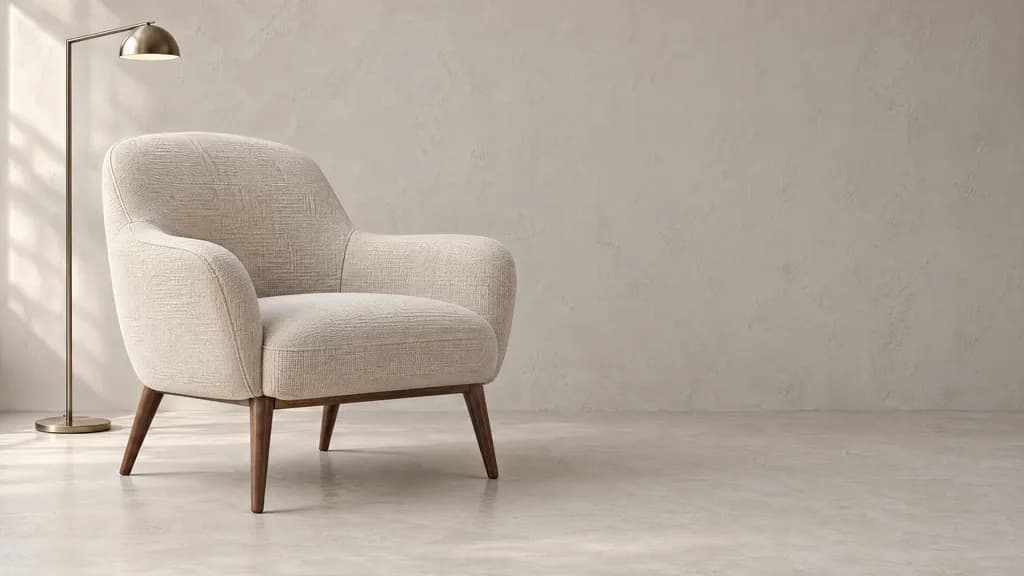
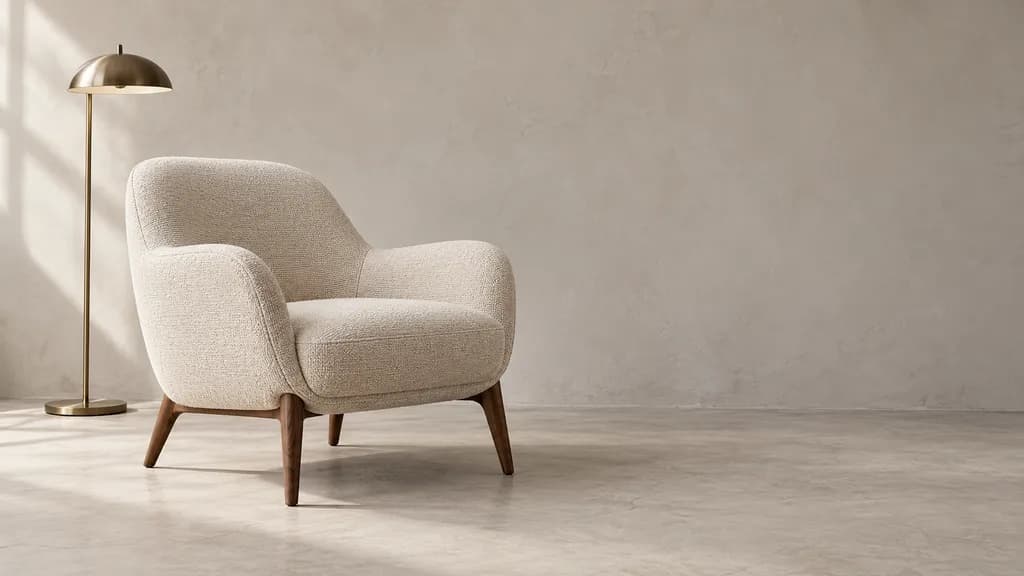
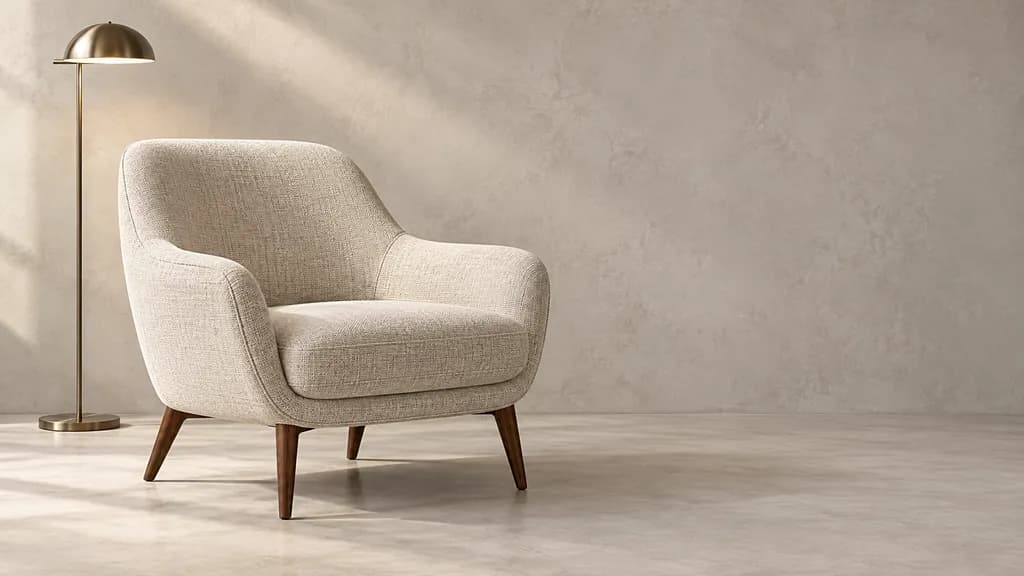
[Insert image: the API, ChatGPT, and Codex results]
What the Images Showed
All three images included the chair, lamp, and open space on the right. None needed an upscale merely to make the scene recognizable or the composition useful.
The API image placed a larger chair in the frame. Its upholstery showed a pronounced woven pattern, with visible seams and wood grain on the legs.
The ChatGPT image left more open space around a smaller chair. Its fabric looked more granular, but the chair outline and contact shadows were already clear.
The Codex image used a different chair shape and lamp design. Its upholstery had a visible interwoven texture. Matching the ChatGPT file dimensions did not make the two images visually identical.
These were independent generations, not the same image rendered at different sizes. Their material and composition differences cannot be attributed to resolution alone.
When to Upscale—and Which Multiplier to Choose
Upscale when an approved image lacks the pixels needed for its final placement. For this project, the ChatGPT and Codex images were too small to fill the target display without enlargement.
A smaller website placement may not need that step. Cropping can create the opposite problem: even a 4K source may leave too few pixels after you isolate part of the image.
Integer Multipliers Can Overshoot the Target
My upscaling tool offered whole-number multipliers. I chose 2× for the ChatGPT result, increasing it from 1672 × 941 to 3344 × 1882.
That increased the dimensions but did not reach the delivery target. "Upscaled" and "4K" were still different states.
With this tool, a practical next choice would be 3×. That would produce 5016 × 2823, leaving enough pixels to reduce the image to the required output size. This is a calculated option, not another tested result.
The original image is close to 16:9 rather than exactly that ratio. Preserve its proportions when resizing, then make the small crop needed for an exact 3840 × 2160 export. Avoid stretching the chair to force the dimensions.
Inspect the Result Before Accepting It
The enlarged ChatGPT image kept the overall composition close to its source. Fabric texture and seams looked more prominent, while some wall texture also became more noticeable.
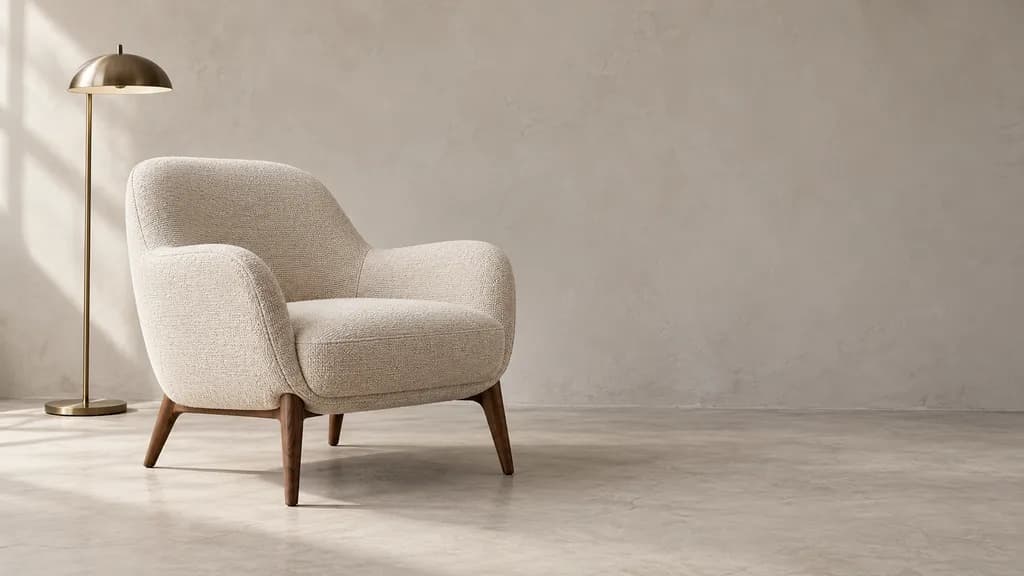
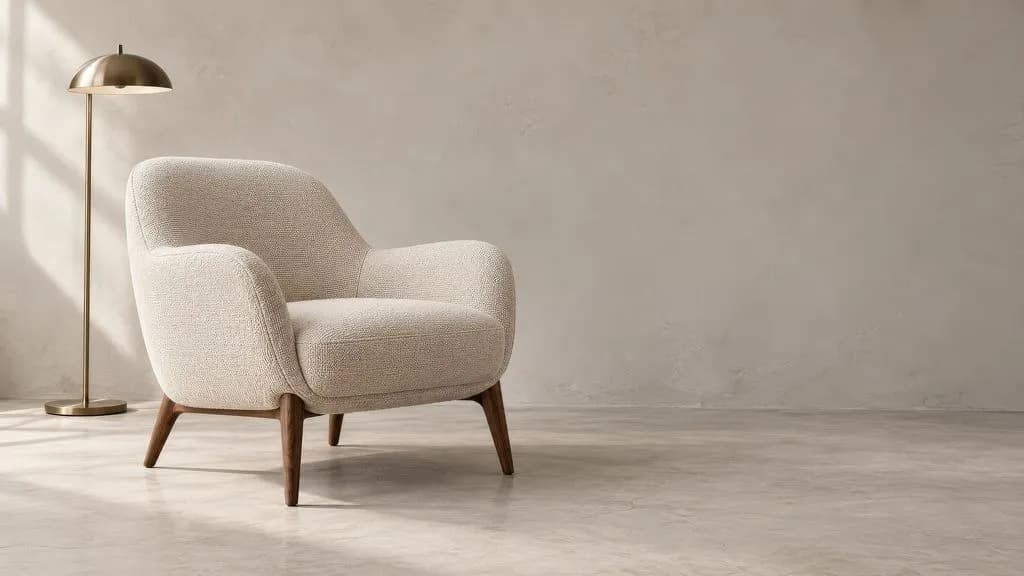
[Insert image: the ChatGPT image before and after upscaling]
More visible texture is not proof that the upscaler recovered original detail. Look for natural fabric patterns, clean lamp edges, believable wood grain, and a quiet background suitable for text.
If the chair's construction is wrong, fix that before enlargement. Extra pixels do not validate product geometry or make invented details accurate.
Can You Use It Directly in a Professional 4K Workflow?
The API result could enter the 4K layout stage without a separate size-enlargement step. It still needed visual review and final design work. The ChatGPT and Codex results needed additional processing to meet this project's dimensions.
Use the following decision rules when choosing a route:
Your requirement | Practical choice |
You need a 3840 × 2160 source with minimal size processing | Choose a route that exposes output-size settings and verify its downloaded result |
You already have an approved smaller image | Upscale that image, then inspect the result |
You plan to crop tightly into the product | Check the retained pixel dimensions before preparing the final export |
The image has incorrect structure or material details | Correct the image before investing in enlargement |
Before paying for a generation route, check whether its size option applies to the downloaded file. Also check whether enlargement is a separate step. A "4K" label provides less useful information than a confirmed width and height.
You can also try GPT Image 2.5 in Virse, then check the exported dimensions against your delivery requirements.
For final approval, inspect the image in the intended layout. Check critical details at 100% zoom and review the complete design at its intended display size. Add campaign text and logos as separate design elements so they remain editable and clear.
FAQ
Does Max Quality Guarantee a 4K File?
Do not use the quality label as proof of output size. Check the size setting and downloaded dimensions separately. This resolution test did not compare quality tiers, so it cannot establish whether a tier changes size in a particular interface.
Can Changing DPI Turn a Smaller Image into 4K?
Changing only the DPI metadata does not add pixels. To change the pixel dimensions, you must resample or upscale the image. For a digital display, check pixel width and height first.
Is a 4K Image Automatically Suitable for Professional Printing?
No. Print suitability depends on the physical print size, viewing distance, detail requirements, and the printer's specifications. Ask for the required dimensions and resolution before preparing the file.
Más del blog de Virse
Producto
GPT Image 2.5 Quality Settings Explained: Low vs Medium vs High vs XHigh vs Max
9 de octubre de 2026 by Yifan Zhao
Producto

What Is Product Design in 2026? What Product Designers Actually Do
21 de septiembre de 2026 by Vincent
Producto
GPT Image 2.5 Pricing: Flare vs Sunburst & the Real Cost per Image
14 de septiembre de 2026 by Vincent