
GPT Image 2.5 Keeps Changing My Image: How to Use a "Keep List" for Reliable Edits
 Yifan Zhao読了 10 分 ·
Quick Answer
To reduce unwanted changes, state the edit, add "Keep everything else the same," and list the details that must survive. Also allow the adjustments needed to complete the edit naturally.
A Keep List can be short. For a person turning toward a poster, the critical requirement might be: "Keep her arms relaxed at her sides and her hands outside her pockets." You do not need a long description of every object for every edit.
In my GPT Image 2.5 Sunburst example, a turn-only request produced an extra hands-in-pockets pose. Both a short preservation instruction and a structured Keep List retained the arms-down pose. The longer prompt was not a clear visual winner.
What Our Editing Example Revealed
The source was a design studio photograph. A woman in a pale blue shirt stood beside a framed geometric poster. A notebook and metal lamp sat on the table.
The goal was to turn her toward the poster while keeping the surrounding design. The source image was already acceptable, so a new pose should not become a new scene.
I used GPT Image 2.5 Sunburst with a 16:9 image at 1536 × 864 pixels. You can also try GPT Image 2.5 Sunburst in Virse.
The two preservation versions began from the same original image. Their results were close. I then removed the preservation sentence from the short request and observed a different arm pose.
Request | Observed result |
Turn the woman toward the poster | She turned, but also put both hands in her pockets. |
Turn her, plus "Keep everything else the same" | She turned while keeping her hands down at her sides. |
Turn her, plus a structured Keep List | She turned and retained the relaxed arms-down pose. The main background elements remained. |
The extra pose was clear in the version without a preservation instruction. Her elbows bent, and her hands disappeared into her pockets. The poster, table, and lamp remained broadly similar.
This is a single example for each request, not proof that deleting one sentence always causes a pose change. It does show why the requested action and the actions you want to preserve deserve separate attention.
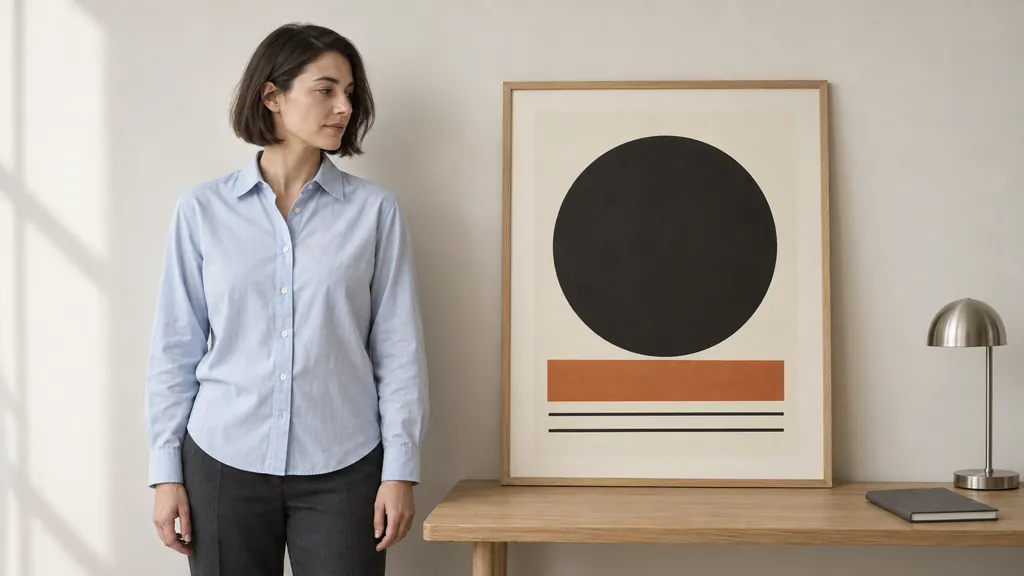
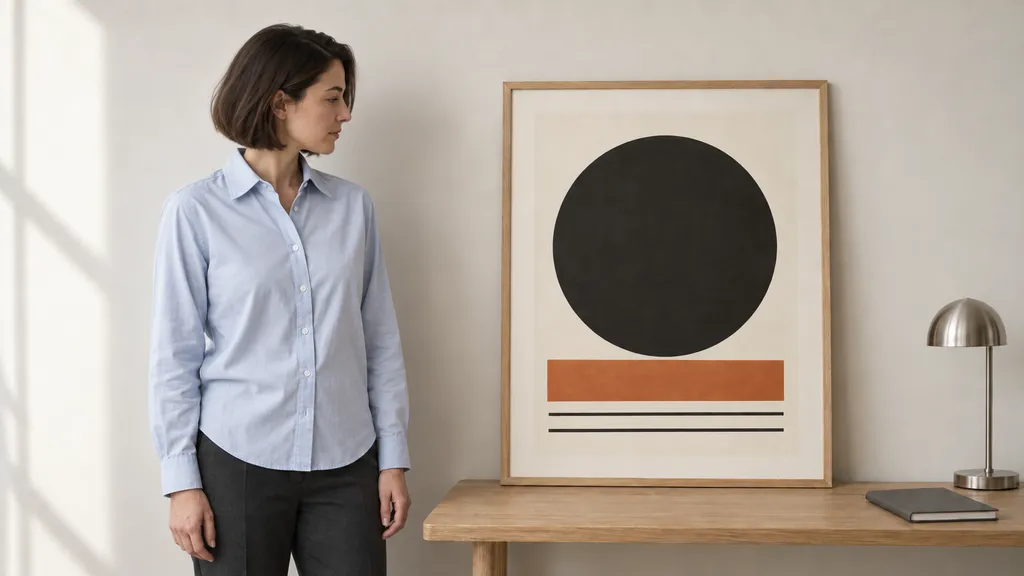
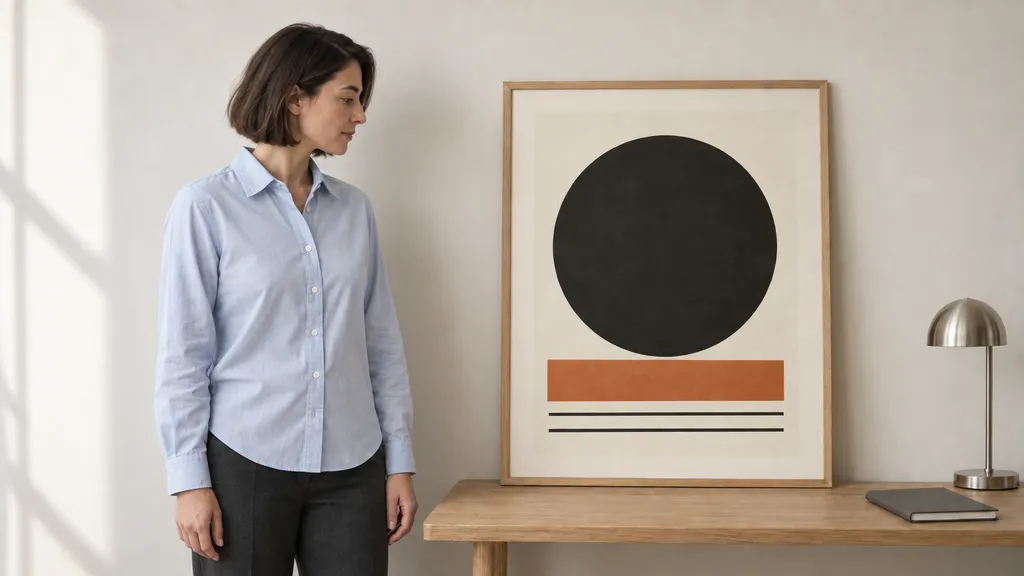
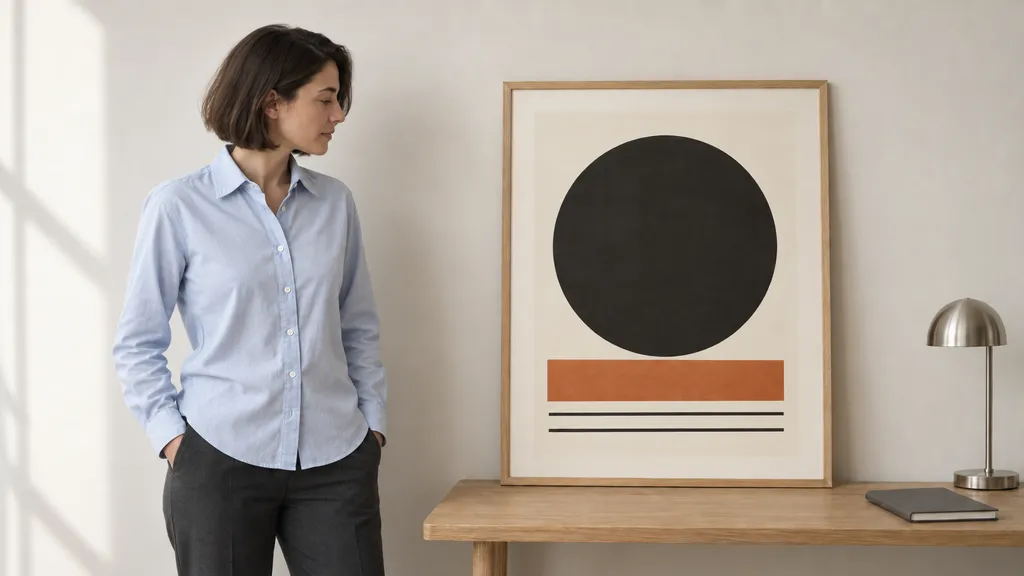
[Insert image: the original photograph and the three turning results]
An earlier clothing replacement also helped set the limits of the method. Both short and detailed prompts preserved the main scene. The detailed version specified a finer knit, while the short version produced a fluffier cardigan. That texture difference was not evidence of better preservation.
The detailed clothing edit also shortened the garment despite a request to keep its hem length close to the original. More instructions did not mean complete compliance.
How to Write a Keep List for Image Edits
Define the Change Before Listing Constraints
Start with the source image you want to preserve. Name the target and the desired result in plain language.
"Turn the woman toward the framed poster" describes an orientation change. "Move her in front of the poster" describes a position change. "Have her point at the poster" adds a gesture.
Choose the action you actually need. Avoid adding broad requests such as "make it more cinematic" when the task is a narrow edit. Those words introduce another design goal that may conflict with preserving the scene.
For this example, the target was her head and upper-body orientation. Moving closer, touching the artwork, and changing her hand pose were outside the brief.
List the Details That Must Remain
Treat the Keep List as an acceptance checklist. Include the details whose loss would make the edit unusable.
Read the actual source before writing it. Do not ask to preserve a label, object, or feature that is absent from the image.
Category | What to specify | Example from the studio image |
Person or product | Identity, clothing, geometry, and actions outside the edit | Same woman, hairstyle, shirt, and trousers; arms relaxed at her sides |
Composition | Placement, apparent size, spacing, and overlaps | Keep her on the left, at the same distance from the poster |
Camera | Viewpoint, framing, perspective, and depth of field | Preserve the existing eye-level view and framing |
Background | Objects, artwork, text, and their arrangement | Keep the poster, table, notebook, lamp, and wall |
Lighting | Direction, exposure, and overall color | Preserve the original daylight and exposure |
Output | Dimensions and image boundaries | Retain 1536 × 864 pixels without cropping or extending the canvas |
Choose the relevant rows rather than copying the entire table into every request. A simple color edit may need only the object’s shape, material, and surrounding scene. A layout-sensitive design may need exact text, spacing, and object relationships.
Allow the Adjustments the Edit Requires
A Keep List needs room for the requested change. Turning a person affects the visible facial profile, shoulder angle, clothing folds, and local shadows.
Preserving identity does not mean preserving the original front-facing outline. Likewise, keeping the person in the same location does not require every edge of her silhouette to stay in place.
Write an allowed-adjustments sentence for those dependencies:
Allow her facial profile, shoulder angle, shirt folds, and local shadows to adjust naturally for the turn.
This separates necessary movement from an unrelated new gesture. The shoulders can turn while the arms remain relaxed.
Match the Output Settings to the Source
Select the original aspect ratio and dimensions in the output settings. Also ask for no cropping, canvas extension, zoom, or reframing.
Dimensions and framing are separate checks. An image can keep the same pixel size while moving the subject, changing its scale, or cutting off an edge.
For this project, the output requirement was 16:9 at 1536 × 864 pixels. For another source, replace those values with its actual dimensions. A size instruction in the prompt is not a substitute for checking the exported file.
Copy-and-Paste Keep List Prompts
A Short Template for a Focused Edit
Use this when the target is clear and only a few details need explicit protection. This is a reusable template, not an additional tested output.
Edit the supplied image: [specific change and desired result].
Keep everything else the same. In particular, preserve [the critical details that must remain].
Allow [necessary adjustments] only as needed for the requested edit.Keep the original framing and output at [width × height]. Do not crop, extend the canvas, or reframe.
For the studio task, the most useful extra detail is the arm pose. "Keep both hands visible outside her pockets" makes that requirement easy to inspect.
The Structured Prompt Used in Our Example
This version made the scene requirements explicit. Its result preserved the main elements, but did not clearly outperform the shorter preservation request.
Edit the supplied photograph.
CHANGE
Turn the woman’s head and upper body toward the framed poster on her right, so she is visibly looking at the artwork rather than past it. Show her in a natural three-quarter side view.
KEEP
Keep her standing in the same location, at the same apparent size and distance from the poster.
Preserve the same person, hairstyle, pale blue cotton shirt, and charcoal trousers.
Keep her arms relaxed at her sides. Do not make her point at, touch, or hold the poster.
Keep the poster, frame, artwork, table, notebook, lamp, and wall in their original positions and sizes.
Preserve the camera viewpoint, framing, perspective, lighting direction, and overall exposure.
ALLOWED ADJUSTMENTS
Adjust her visible facial profile, shoulders, clothing folds, and local shadows as needed for the turn.
Her face and body do not need to retain their original front-facing outlines.
OUTPUT
Keep the original 16:9 framing and output at 1536 × 864 pixels.Do not move her closer to the poster, move the poster, add objects, crop, or reframe.
Each section has one job. Change defines the action. Keep protects approved details. Allowed adjustments resolves the dependencies of the turn. Output defines the frame and export requirements.
A Reusable Template for Detailed Edits
Use this version when several design requirements must survive. Replace the brackets and delete irrelevant lines before using it.
Edit the supplied image. Use it as the reference for details not explicitly changed.
CHANGE
Change [target] to [specific result]. Limit the edit to [area or scope].
KEEP
- Subject: [identity, product shape, clothing, or unaffected actions].
- Composition: [positions, apparent sizes, spacing, and overlaps].
- Camera: [viewpoint, framing, perspective, and depth of field].
- Background: [objects, artwork, and exact text that must remain].
- Lighting: [direction, exposure, and color treatment to preserve].
ALLOWED ADJUSTMENTS
Allow [folds, reflections, shadows, perspective, or other necessary changes] within [defined area].
OUTPUT
Use [aspect ratio] and [width × height].Do not [specific unwanted changes].
Update the list for the task. A background replacement cannot also preserve the original background. A position change cannot keep the subject at its original location.
Keep new design specifications separate from preservation. A requested neckline or knit texture defines the replacement garment; it does not protect the surrounding photograph.
Check the Requested Edit and the Keep List Separately
First check whether the target changed correctly. Then inspect the details you asked to preserve.
For the studio image, the first question was whether the woman turned toward the artwork. The second was whether her arms, location, clothing, and surroundings still met the brief.
Check | Acceptable change | Unwanted change |
Pose | Head and shoulders turn toward the poster | Hands move into pockets or begin pointing |
Appearance | Facial profile and shirt folds follow the turn | Clothing is replaced or the person becomes visibly different |
Layout | Silhouette changes within the existing placement | Person moves closer or poster shifts |
Frame | Original view and margins remain | Zoom, crop, or a new camera angle |
Inspect critical details close up, then return to the full image. A result can look attractive and still fail a required action or spatial relationship.
Do not treat a visually similar background as pixel-identical. This example supported broad scene preservation, not exact preservation of every pixel.
What to Do If Unrelated Details Still Change
Fix the missing or conflicting requirement before making the whole prompt longer.
Problem | Next action |
A new gesture appears | State the required arm or hand pose directly. |
The subject moves or changes size | Specify its placement, apparent scale, and distance from a stable object. |
The requested movement is too limited | Remove constraints that freeze the body parts needed for the action. |
The scene is restyled | Remove broad style requests and name the approved visual treatment to preserve. |
A required detail is still wrong | Return to the original source and revise that requirement. Avoid making the altered result your only reference. |
Untouched areas must remain pixel-identical | Use a local editing or compositing process that retains those original areas. |
When a pose fails, describe the desired pose. "Arms relaxed at her sides, hands visible" is more useful than repeating "do not change anything" several times.
FAQ
Is "Keep List" a Special GPT Image 2.5 Command?
No. It is a way to organize ordinary editing instructions. Headings such as "Keep" make the requirements easier to read and revise; they are not a locking feature.
Can I Reuse the Same Keep List for Every Edit?
Reuse the stable requirements, then update the list for the new task. Remove any item that conflicts with the requested change.
Should I Include Exact Text from Posters or Packaging?
If the wording matters, include it in quotes and specify its placement and typography. Check the output against the source for spelling, line breaks, and layout.
Can a Keep List Restore Something That Has Already Changed?
"Keep" does not explain which earlier version you want back. Supply the original reference and state the restoration explicitly, such as restoring the original hand pose or headline.
Virse ブログの他の記事
ワークフロー

GPT Image 2.5 Noise and Oversharpening: Why Some Images Still Look AI-Generated
2026年10月9日 by Yifan Zhao
ワークフロー
GPT Image 2.5 Editing Drift: Why Images Get Blurry, Cropped or Worse After Multiple Edits
2026年10月9日 by Yifan Zhao
ワークフロー

How to Master Grid-Based Design: Choose the Right Grid, Use It Well, and Know When to Break It
2026年10月7日 by Yifan Zhao